Linelighter

Why a ruler

Losing your line is a tax on every paragraph.

A dyslexic reader doesn't read less — they re-read more. The eyes leave the text all day: to think, to take a note, to check a diagram. Every return means hunting through a block of near-identical lines for the one that was yours. We have not measured that in a lab and we are not going to pretend we have. Ask any reader who does it, though, and they will tell you the hunt is the part that turns one page of homework into an evening.
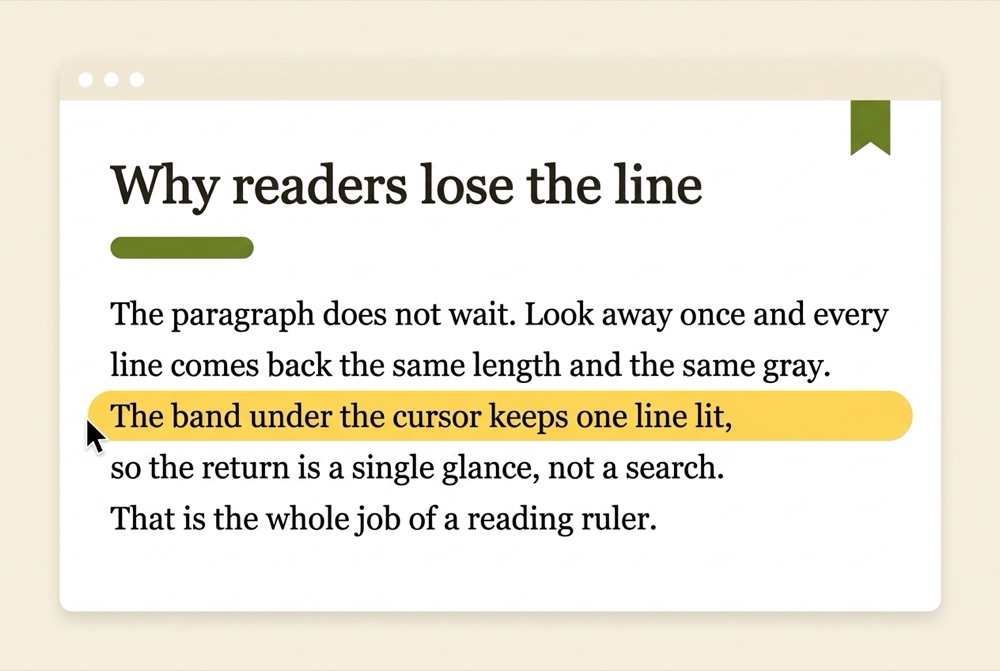
A webpage in a light browser window: a serif article titled ‘Why readers lose the line’, with one translucent Sunbeam-yellow band highlighting the single line under the cursor.
The whole product in one picture: an article, a resting cursor, one lit line.

Linelighter shortens the hunt to one glance — the band is already on the line you left. A tinted band sits under your cursor, so your place is marked by the thing your hand already moves. Rest the pointer in the margin and read; when your eyes come back, the band is exactly where you left it.

It stays out of your way, too. The ruler injects only when you call it — a toolbar click or Alt+R — and runs on no page you didn't ask it to touch. There are no host permissions in the free tier. Settings live in your Chrome profile and roam with it, so a school Chromebook remembers you by lunchtime. Nothing about your reading leaves the browser.
What you get, exactly

Three moving parts. All of them yours, free.

The band

Height runs 32 to 120 px, tint from 8% to 50%, square or rounded ends. On light pages the tint multiplies, so the words under it stay dark — highlighted, never hidden.

Linelighter's default band: 64 px at 22% Sunbeam — one line of body text, softly lit.

The hotkey

Alt+R switches the ruler on or off anywhere, with an on-page toast to confirm. If another extension owns the shortcut, Linelighter says so and offers a fix — it never advertises a dead key.

Alt+R holds your line or lets it go. One key down, one key up, no menu trips mid-sentence.

The font

One toggle re-sets any page in OpenDyslexic — a face with weighted bottoms that many dyslexic readers find steadier. The font ships inside the extension, so no page you read ever calls a font server.

Literata on the left, OpenDyslexic on the right: one switch in the popup.

For schools, families & SEN coordinators

One Admin-console push covers the whole reading room.

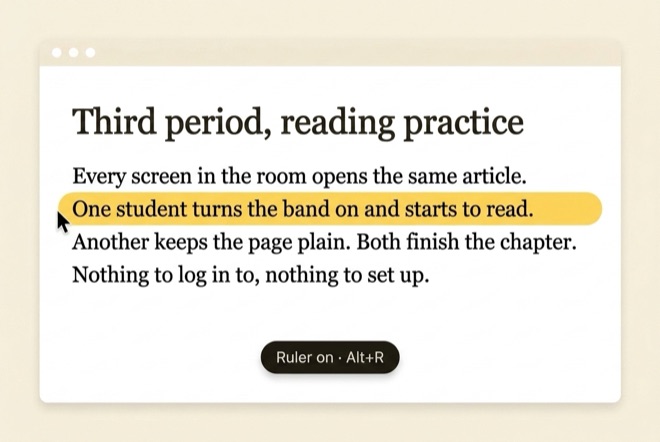
A classroom reading page in a browser window: the Sunbeam band lit on one line, and a dark on-page toast reading ‘Ruler on · Alt+R’.
A classroom screen mid-chapter: Alt+R switched the band on, the toast confirmed it.

Packaged for Google Admin force-install. One policy will push Linelighter to every managed Chromebook — that route opens with the Chrome Web Store listing, which is not published yet. Today a resource room loads it unpacked in four steps on the machines it wants.

The free tier needs no license and no accounts. Ruler, tint, dyslexia font and hotkey all work end to end — no trial clock, no seat count. Until the Web Store listing is up, trial it on a handful of machines rather than a whole fleet.

Minimal permissions, easy to audit. Storage plus activeTab and scripting — the ruler runs only when a student invokes it, and no reading data leaves the device.

Pro unlocks the full tint palette, spacing controls and per-site profiles. For a fleet we have not set volume tiers yet — send your seat count and we will quote by return mail.

SEN coordinators: the free tier alone is enough to run a proper classroom trial — start there.

The honest part

Worth knowing before you install.

01

The band follows your pointer — so bring it along.

It helps most when the pointer travels with you. Rest it in the margin and nudge it down as you read — the same hand movement you already make to scroll. If you never touch the mouse while reading, a ruler is the wrong tool — switch on the free dyslexia font, or open Pro's spacing controls instead.

02

Chrome keeps some doors shut.

No extension can run on chrome:// pages or the Chrome Web Store — Chrome forbids it. Linelighter can't hold your line there either.

03

The ruler arrives on demand, not by default.

Because there are no host permissions, a freshly loaded page needs one toolbar click or one Alt+R before the band appears. That is the trade for an extension that touches nothing uninvited.

04

Dark pages get a different blend.

On dark sites the tint switches from multiply to normal blending at lower opacity so it stays visible. A few heavily styled pages will still swallow it.

05

Pro checkout isn't live yet.

Locked controls show what Pro adds, and the free tier ships complete either way. If you want Pro or a site license now, mail [email protected] and we will invoice you by hand and switch it on — we reply the same working day.

06

Where to start the two sliders.

The default is a 64 px band at 22%, which covers one line of ordinary body text. If the reader uses enlarged type, raise the band to 88 px so a whole line still fits inside it. If the tint itself is distracting, drop it to 12% before deciding a ruler is the wrong tool. Everything changes while you read — nothing needs saving.

An extension that tells you its limits is one you can hand to a classroom.

There are no testimonials on this page because Linelighter is new and we are not going to invent any. If you are a reader, a parent or a SEN coordinator who tries it, write to [email protected] and tell us what the band got wrong. We read every one, and the fixes go into the free tier first.

Pricing

The ruler and the font are free. Pro is $19 a year — or $39, once.

COMPLETE

Free

$0 forever

  • Reading ruler that follows your cursor
  • Band height 32–120 px, tint 8–50%, rounded ends
  • OpenDyslexic font swap on any page
  • Sunbeam tint + page tint overlay
  • Alt+R hotkey with on-page toast
  • No account, no trial clock, no data collected
PRO

Pro

$19 a year

or $39 once, yours forever — there is no monthly plan

  • Everything in Free, plus:
  • Six more tints + custom colors
  • Letter, word & line spacing controls
  • Per-site profiles — each site keeps its own setup
  • Saved tint profiles for different readers
  • School site licensing — quoted by seat count
Ask about Pro

Pro unlocks inside the extension once checkout ships — until then we invoice by hand, and the limits are listed just above.

Pro exists for readers who want the page tuned further — more colors, wider spacing, a memory for every site. The free tier stays complete without it.

Get the ruler

Add Linelighter to Chrome.
The ruler is free.

Linelighter loads unpacked today, in four steps. The Chrome Web Store listing follows — and nothing in the free tier changes when it does.

  1. 1

    Open chrome://extensions in Chrome.

  2. 2

    Switch on Developer mode, top right.

  3. 3

    Click Load unpacked and pick the 10-reading-ruler folder.

  4. 4

    Pin Linelighter, open any article, press Alt + R.

Reading this on a phone? Chrome extensions install on desktop only, so mail yourself the four steps and set it up when you are back at a computer.

Works in Chrome and Chromium browsers · Settings sync with your Google profile · No account